

Muhtar
Project Admin
New Client Deployment – Available After the Upcoming Server Reset
We're excited to announce that a brand new client will be deployed during the upcoming server reset. This update introduces several highly requested quality-of-life improvements, along with the new UI Scaling system.UI Scaling
UI Scaling is now available under Options → Interface, allowing you to customize the size of the game's interface to better suit your display.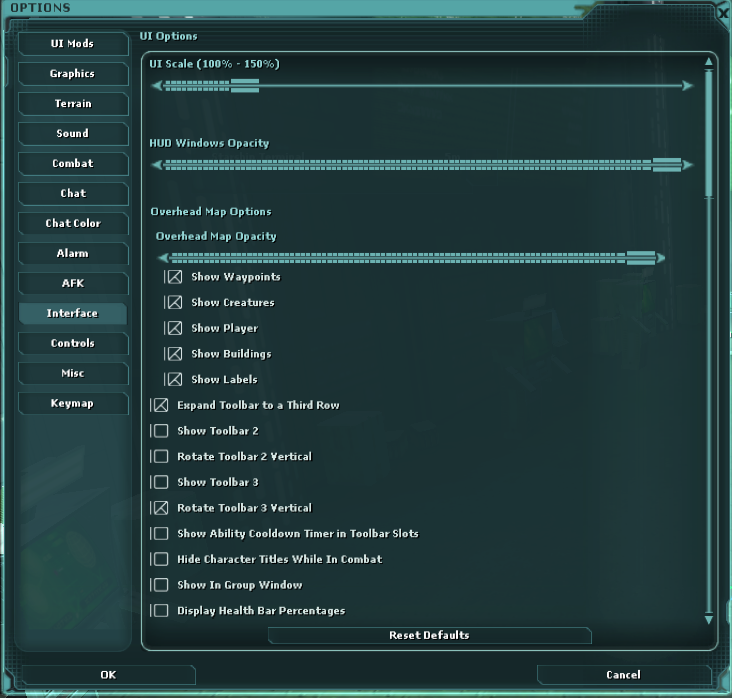
How it works
- UI Scaling can only be adjusted while you're on the ground.
- Changes are applied live, so you'll see the interface update instantly as you adjust the scale.
- Because the UI is rebuilt each time the scale changes, we recommend making adjustments slowly or selecting your preferred preset rather than rapidly moving the slider.
- Once you've saved your preferred scale, it will automatically be applied while you're in space.
- The system does its best to preserve the position of your existing UI. However, as the scale increases, some elements may shift slightly to accommodate the new layout.
Character & Ship Ordering
You can now fully customize the order of both your characters and your ships.Character Selection
Right-click a character on the login screen and use Move Up or Move Down to arrange your character list exactly how you want it. Your chosen order is saved and will persist between sessions.Ship Terminal
The same functionality has been added to the ship terminal. Simply right-click a ship and use Move Up or Move Down to organise your ships in your preferred order. Your custom order is also saved permanently.More Quality of Life Improvements
This client also includes several additional enhancements:- Multi-select drag and drop for inventory management.
- A brand-new Inventory Search Bar, making it much faster and easier to locate items.
- Numerous UI typos inherited from the original client have been corrected.
- Various UI systems and underlying files have been optimized as part of the UI Scaling implementation, resulting in a cleaner, more efficient client.
Important
A new client is required to connect to SWG: Beyond after the server reset.Older client versions will no longer be accepted and will be unable to connect to the galaxy.
We hope you enjoy these improvements, and thank you to everyone who helped test the new client. This is just the beginning, and we have plenty more exciting features planned!